1. NEWS
  2. DASHBOARD
    1. Smart Search
  3. GUESTS
    1. LIVESTREAM GUEST PASS
    2. GUEST CHAT ACCESS
  4. THREADS
    1. Unresolved Threads
  5. BLOGS
    1. Articles
  6. BOUNXUP RADIO
    1. Radio Stations TT
  7. GALLERY
    1. Albums
    2. Map
  8. SPORTS
    1. SPORTS LIVESTREAM
  • Login
  • Register
  • Search
Everywhere
  • Everywhere
  • Articles
  • Pages
  • Forum
  • Blog Articles
  • FAQ
  • Gallery
  • More Options
  1. BounXup Central
  2. FAQ

Turning Off / Hiding Your Online Status

USER PROFILES

  • FAQ

The Who Is / Was Online Status Icons shows all users who are online or who was online and when their last activity occurred.

162-image-png

This is only visible to Registered users and only if they are logged in.

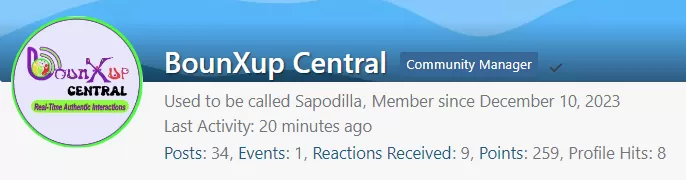
You can turn this status off (become invisible) on the Who/Is Status Bar From your User Profile Control Panel.

This also hides your activity status if someone visits your profile page

WITH VISIBILTY TURNED ON:

WITH VISIBILITY TURNED OFF:
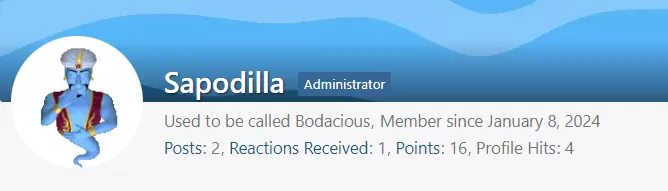
This Also Hides Your "Online Status" on Threads & Posts in the Posts Author Side Panel

WITH VISIBILTY ON:

166-image-png


VISIBILITY TURNED OFF

165-image-png

It also Shows Your Status as "offline" in the Signature Block

Images

  • image.webp
    • 6.73 kB
    • 277 × 409
  • image.webp
    • 11.32 kB
    • 269 × 497

Categories

  1. GENERAL 2
  2. USER PROFILES 9

Footer Menu

  1. GUESTS
    1. Login | Register
    2. Livestream Guest Access
    3. Guest LiveChat Access
  2. Dashboard
    1. Recent Activities
    2. BounXup Email
  3. COMMUNITY
    1. News
    2. Threads
    3. Blog
    4. Weather Centre
  4. BOUNXUP RADIO
    1. TT Radio Stations
  5. FAQs
    1. Privacy Policy
    2. Terms
    3. Legal Notice

BounXup™ BounXup Central™ FHIST News™ Buss-A-Mark™ LiMeStream™ and All Other Asssociated Named Shows are trademarks of BounXup Media Network™ a wholly-owned subsidiary of Aripo Media Group, LLC ©copyright 2026, all rights reserved

Powered by WoltLab Suite™
Style: »Atelier« by Elevenfour